
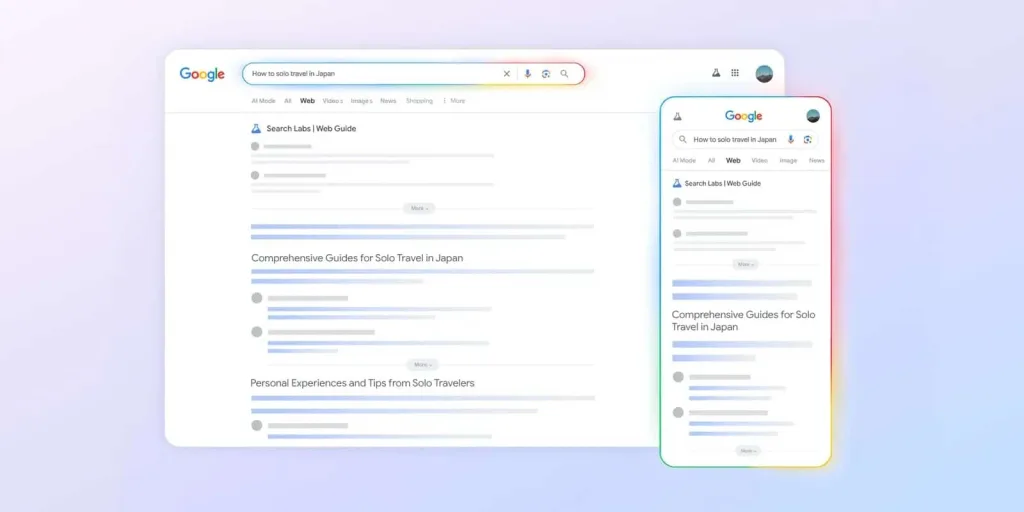
Overviews, then AI Mode, and now Google Web Guide: a new search experience that reorganizes results into magazine-style topic groups, dynamically generated by artificial intelligence. If you run an online business or work on your site’s SEO, this affects you directly.
In this article, we explain exactly what Google Web Guide is, how it works under the hood, how it differs from AI Overviews and what you need to do on your site to gain visibility in this new format.
What is Google Web Guide?
Google Web Guide is a new search experience that uses a custom version of Gemini to organize results into topic groups instead of showing the traditional list of ten blue links.
Launched in July 2025 as an experiment in Google Search Labs, Web Guide turns the results page into something that looks more like a digital magazine than a classic search engine. For a query like “best digital marketing tools,” instead of a flat list you might see sections such as “Free tools to get started,” “Email marketing platforms,” “Community recommendations” or “Top-rated by professionals,” each with its own clickable links.
The key difference from AI Overviews is fundamental: Web Guide is designed to get users to click. Rather than answering the question directly in the SERP like AI Overviews do, it organizes and presents the best results so users can explore and dig deeper. That makes it the most website-friendly AI search feature Google has launched so far.
As of March 2026, it’s available in the United States and Google is expanding it to other markets. If you work on your website’s SEO, this is one of the changes you need to understand as soon as possible.
How Google Web Guide works under the hood: query fan-out
The core mechanism behind Web Guide is what Google calls query fan-out: when a user enters a search, the AI doesn’t search for that exact query. Instead, it expands it into multiple related sub-queries simultaneously.
Here’s how it works: you enter “email marketing tools for small businesses,” and Gemini analyzes your query and generates derived sub-queries such as “free email marketing platforms,” “Mailchimp vs Brevo comparison,” “email automation for SMBs” or “best e-commerce newsletters.” All of those sub-queries are searched at once, the results are collected and deduplicated, and Gemini organizes them into topic groups, each presented with a descriptive heading.
This has huge implications for SEO. It means a page specializing in a specific angle of a topic can appear in a Web Guide group even if it doesn’t rank in the top 10 for the main query. If you’ve written the most comprehensive article on a specific subtopic, Web Guide can give you visibility over larger domains with more overall authority.
Personalization: every user sees a different SERP
Web Guide results are heavily personalized based on the user’s search history, interests, location and the device they’re searching from. Two users searching for the same thing may see different topic groups, ordered differently and with different results in each group.
This has direct implications for local SEO: if your business has a defined geographic presence, Web Guide may show you more often to users searching from your area, which makes it even more important to get the location signals on your site right.
How Web Guide differs from AI Overviews and AI Mode
Google is developing three AI search experiences at the same time, and it’s important to understand how they differ in order to optimize correctly:
| Feature | Web Guide | AI Overviews | AI Mode |
|---|---|---|---|
| What it shows | Topic groups with clickable links | AI-generated summary with citations | Full conversational answer |
| Do users click? | ✅ Yes, every result is clickable | ❌ Rarely | ❌ Rarely |
| Generates AI text | Short headings only | Yes, a full summary | Yes, a conversational answer |
| Best for | Exploratory, open-ended queries | Quick factual answers | In-depth research |
| Impact on CTR | Positive or neutral | Cuts clicks by ~58% | Cuts clicks drastically |
The most important difference is user behavior. AI Overviews satisfy search intent directly in the SERP, removing the need to click. Recent research shows that AI Overviews reduce organic CTR by up to 58% and that only 8% of searches with AI summaries end in a click, compared with 15% without them.
Web Guide solves that problem at the root: it’s a SERP that, by design, requires users to click to access the full content. For website owners and SEO agencies, that’s good news in an ecosystem where more and more searches end without a click.
Which types of searches trigger Web Guide
Web Guide doesn’t replace traditional results for every type of search. Right now it mainly appears for:
- Exploratory queries — “things to do in Barcelona,” “ideas for decorating an online store”
- Complex queries — “how to choose a digital marketing agency for my business”
- Open-ended queries — “what should I know before doing SEO,” “how to start selling online”
- Research searches — comparisons, lists, buying guides
It doesn’t appear for direct navigational queries (looking for a specific website) or for simple factual questions with a single correct answer. That makes it especially relevant for informational, educational and purchase-decision content: exactly the kind of content any business working on AI search visibility and GEO should be producing.
Why Web Guide is strategically important for Google
Understanding Google’s incentives helps explain why Web Guide may be the format that survives in the long run. Google’s business model depends on ad clicks: a user searches, sees ads alongside the organic results, clicks, and the advertiser pays.
AI Overviews and AI Mode are cannibalizing that model: if users get the answer right in the SERP without clicking, ads lose value. Web Guide solves this because every result is a clickable link, which keeps the ad inventory intact. Web Guide is also computationally cheaper than AI Overviews because it uses AI to organize and label results, not to generate long answers.
According to Patrick Stox, Product Advisor at Ahrefs: “Most likely, Web Guide + Gemini are the survivors. It’s what Google has always done with fractured intent—show a mix of results—but now actually organized.”
How to optimize your site to appear in Google Web Guide
The good news is that optimizing for Web Guide doesn’t require a radically different strategy from good old-fashioned SEO. It reinforces exactly the principles Google has been asking for for years. Here are the specific actions:
1. Build topic clusters instead of isolated pages
Web Guide organizes results by subtopics derived from the main query. If you have a pillar page on “digital marketing for SMBs” and supporting articles covering specific subtopics—email marketing, social media, local SEO, Google Ads for small businesses—each of those articles can appear in a different Web Guide group for the same search.
This means specialized sites have a real chance to compete with higher-authority domains. If you have the most comprehensive article on a specific angle, Web Guide can put you in front of users who would never have found you on a traditional SERP.
2. Use specific, descriptive H2 and H3 headings
Gemini needs to quickly classify what your page is about to decide which topic group to include it in. Vague headings like “Key points” or “Important considerations” don’t help. Descriptive headings like “How to choose an email marketing tool based on your company’s size” or “Why local SEO is different from national SEO” do.
Review every H2 and H3 in your main articles and make sure each one accurately describes the specific angle that section covers.
3. Build internal links between pages in the same cluster
Internal links between articles in the same topic cluster signal to Gemini that those pages form a cohesive group on one subject. Link your supporting articles to the pillar page and to each other where relevant. This distributes authority internally and strengthens the topical signal of the whole set.
If you’re not yet sure where your site stands technically on this front, an SEO audit is the first step to identify which pages need strengthening and which internal linking opportunities you’re missing.
4. Create content for fan-out query types
Query fan-out expands your search into predictable sub-queries. To get ahead of them, research the questions and subtopics around your main keyword: comparisons (“X vs Y”), tutorials (“how to do X”), attribute queries (“which is more X”), local queries (“X near me”), entity questions (“is X a good option for Y”). If you have content answering each of those angles, you have a better chance of appearing in several Web Guide groups for the same search.
5. Implement robust schema markup
Schema markup helps Gemini understand the type of content on your page and classify it correctly in the right topic group. Article Schema, FAQ Schema and HowTo Schema are especially relevant for the kind of content that tends to appear in Web Guide. If you haven’t implemented them yet, it’s one of the technical changes with the best effort-to-results ratio.
How to tell if you’re appearing in Web Guide
There’s no dedicated Web Guide monitoring tool yet, but there are signals you can track:
- Impression increases on supporting pages — if a specialized article starts getting impressions for keywords broader than its specific topic, it may be a sign it’s being included in Web Guide.
- Traffic growth on pages outside the top 10 — one of Web Guide’s traits is that it can give visibility to pages that don’t rank well on the traditional flat SERP.
- Monitoring in Search Console — filter impressions and clicks by URL to spot pages with unexpected visibility gains on queries broader than their target keyword.
As Web Guide matures and possibly graduates from Search Labs into a full product, Google Analytics and Search Console will likely add more specific data on this channel.
Web Guide, GEO and the new search ecosystem
Web Guide isn’t an isolated phenomenon. It’s part of a broader transformation of the search ecosystem in which Google, Perplexity, ChatGPT and other generative engines compete to be users’ entry point to information.
The right strategy in 2026 isn’t to optimize only for traditional Google, only for AI Overviews or only for Web Guide. It’s to build content with enough depth, structure and topical authority to be relevant across all of those formats at once. That’s exactly what AI search visibility and GEO aim to achieve: visibility across the entire search ecosystem, not just the usual list of ten results.
Conclusion: Web Guide may be the most website-friendly format yet
In a landscape where AI Overviews cut organic CTR by up to 58% and more than half of all searches end without a click, Web Guide represents something valuable: an AI search experience that, by design, drives clicks to websites.
The sites that stand to benefit most are those with deep, well-structured topical coverage: pillar pages with clusters of supporting articles, descriptive headings, consistent internal linking and schema markup in place. In other words, sites that do SEO the way it should be done.
Want to know if your site is ready to appear in Web Guide and other AI search formats? Contact us and we’ll review your situation together.